What SQLite Is Actually Doing
It's one file, a pile of 4 KB pages, and a few B-trees. Open it up and see how SQLite stores, finds, and safely writes your data.
A Database Is Just a File
If you’ve used Postgres or MySQL, you have a mental picture of a database: a server process, a port, connections, users. SQLite has none of that. There is no server. Your application links a library, and the “database” is a single ordinary file that the library reads and writes directly.
Let’s make one and look at it.
$ sqlite3 t.db "
  CREATE TABLE users(id INTEGER PRIMARY KEY, name TEXT, email TEXT);
  INSERT INTO users(name, email)
    VALUES ('ada','ada@example.com'), ('grace','grace@example.com');"

$ ls -l t.db
-rw------- 1 you you 12288 t.db
Two rows, 12,288 bytes. Not exactly tiny for two names — and that number is the first clue. It isn’t 12,000-and-something. It’s exactly 3 × 4096.
Pages: The Only Unit That Matters
SQLite never reads or writes “a row.” It reads and writes pages: fixed-size blocks, 4096 bytes by default. The whole file is nothing but pages laid end to end.
$ sqlite3 t.db "PRAGMA page_size; PRAGMA page_count;"
4096
3
Three pages. That’s the whole file. Every byte of it is readable, so let’s read the start:
$ xxd t.db | head -3
00000000: 5351 4c69 7465 2066 6f72 6d61 7420 3300  SQLite format 3.
00000010: 1000 0101 0040 2020 0000 0002 0000 0003  .....@  ........
00000020: 0000 0000 0000 0000 0000 0001 0000 0004  ................
The first 16 bytes are literally the text SQLite format 3\0. It’s how any tool recognizes the file. The next two bytes, 1000, are the page size in big-endian hex: 0x1000 = 4096. And at offset 28 you’ll find 0000 0003, the page count.
Which pages are these three?
- Page 1 — the file header (the first 100 bytes) plus the root of a special table called
sqlite_schema. - Page 3 — the
userstable’s data, as we’re about to confirm. - Page 2 — not referenced by the schema at all, so we’ll ignore it.
You can even see your own schema stored in plain sight:
$ strings t.db
SQLite format 3
tableusersusers
CREATE TABLE users(id INTEGER PRIMARY KEY, name TEXT, email TEXT)
/gracegrace@example.com
+adaada@example.com
That CREATE TABLE text isn’t parsed from your source code at startup. It’s stored. SQLite keeps a table describing every other table, and that table lives inside the same file:
$ sqlite3 t.db "SELECT type, name, rootpage FROM sqlite_schema;"
table|users|3
rootpage = 3. So the users table’s tree starts at page 3. That’s the lookup SQLite does whenever you run a query: read page 1, find the table’s name, jump to its root page.
Notice also that the two rows appear near the end of the page, in reverse order (grace before ada). Rows are packed in from the back of a page, while an array of pointers to them grows from the front. The gap in the middle is free space. We’ll come back to why that matters.
Tables Are Trees
Two rows fit on one page, so there’s no structure worth showing. Let’s load 100,000 rows.
import sqlite3
c = sqlite3.connect('big.db')
c.execute('create table users(id integer primary key, name text, email text)')
c.executemany('insert into users(name, email) values (?, ?)',
              [(f'user{i}', f'user{i}@example.com') for i in range(100000)])
c.commit()
$ sqlite3 big.db "PRAGMA page_count;"
1704
$ ls -l big.db
-rw-r--r-- 1 you you 6979584 big.db1,704 pages, about 6.9 MB. Now, how does SQLite find id = 77777 among 1,704 pages without reading all of them?
Every table is stored as a B-tree, keyed by that integer id (SQLite calls it the rowid). A B-tree is a tree where each node is exactly one page, and each node holds many children rather than two.
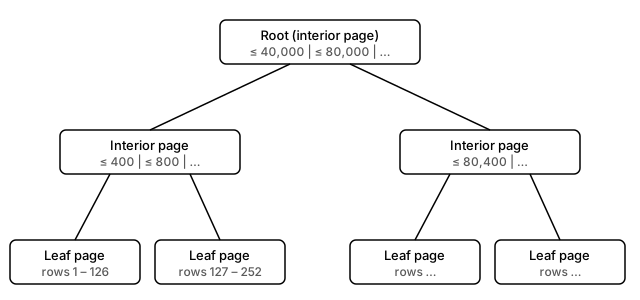
- Leaf pages hold the actual rows, sorted by rowid.
- Interior pages hold only signposts: “rowids up to 400 are down this child, up to 800 down that one…”
- The root is just the top interior page.
Each page’s type is written in its very first byte. For a page like the one at offset 8192 in our big database:
$ xxd -s 8192 -l 12 big.db
00002000: 0d00 0000 7e01 1c00 0fe4 0fc8
0x0d means “leaf page of a table B-tree” (0x05 would be an interior table page). The next fields include the number of cells: 007e = 126 rows on this page. That’s why the tree is shallow: a page holds hundreds of signposts, so even millions of rows only need a few levels. Finding a row costs a handful of page reads, not thousands.
That’s the deal a B-tree makes. Pages are the unit the disk wants to move anyway, so each step of the search discards a huge fraction of the data in one read.
What an Index Really Is
Here’s the part that clears up most performance confusion: an index is just another B-tree.
A table’s B-tree is keyed by rowid and stores whole rows. An index’s B-tree is keyed by the column you indexed and stores the rowid it belongs to. So an index on email is a second, separate tree of (email, rowid) pairs, sorted by email.
$ sqlite3 big.db "CREATE INDEX idx_email ON users(email);
                  SELECT type, name, rootpage FROM sqlite_schema;"
table|users|2
index|idx_email|978
It has its own root page (978) in the same file. That also tells you what an index costs: extra disk space, and an extra tree that has to be updated on every insert.
Looking up by email then becomes a two-step trip: search the index tree for the email, get a rowid, then search the table tree for that rowid.
Watching the Query Planner Choose
You don’t have to guess which path SQLite takes. Ask it with EXPLAIN QUERY PLAN.
# No index on email yet
$ sqlite3 big.db "EXPLAIN QUERY PLAN
    SELECT * FROM users WHERE email = 'user77777@example.com';"
`--SCAN users
SCAN means what it says: walk every leaf page, check every row. All 1,700 pages, for one answer.
# Lookup by the primary key
$ sqlite3 big.db "EXPLAIN QUERY PLAN SELECT * FROM users WHERE id = 77777;"
`--SEARCH users USING INTEGER PRIMARY KEY (rowid=?)
SEARCH means a tree descent. The rowid is the table’s B-tree key, so this is the cheapest lookup there is.
# After CREATE INDEX idx_email
$ sqlite3 big.db "EXPLAIN QUERY PLAN
    SELECT * FROM users WHERE email = 'user77777@example.com';"
`--SEARCH users USING INDEX idx_email (email=?)
The same query flipped from SCAN to SEARCH by adding the tree. One more variant worth knowing:
$ sqlite3 big.db "EXPLAIN QUERY PLAN
    SELECT email FROM users WHERE email = 'user77777@example.com';"
`--SEARCH users USING COVERING INDEX idx_email (email=?)
COVERING INDEX means the answer was already in the index, since it stores email. SQLite never touches the table tree at all. That’s the second step of the trip, skipped.
What Happens When You INSERT
Insertion is a tree operation too. Roughly:
- Descend the B-tree to the leaf page where the new rowid belongs.
- If the leaf has room, write the row into the free space (remember the gap between the pointer array and the packed rows) and update the pointer array.
- If the leaf is full, split it: allocate a new page, move about half the rows over, and add a new signpost to the parent. If the parent is full, split that too, all the way up if necessary.
Rows inserted in increasing rowid order, like an auto-incrementing id, always land on the rightmost leaf, so splits are cheap and pages fill up nicely. Random keys (like a UUID primary key) land all over the tree, which means more splits and half-empty pages. That’s the real reason people warn against random keys, and it falls straight out of how the tree works.
There’s a catch, though. A split touches several pages: the old leaf, the new leaf, the parent. Those are separate 4 KB writes to disk. Now imagine the power dies after the second one.
Surviving a Crash: Journal vs WAL
A tree with half a split written is a corrupted tree. Rows lost, pointers dangling. Databases solve this by never changing the real file until they have a way to undo or redo the change. SQLite has two mechanisms.
Rollback journal (the default)
Before overwriting a page in the database file, SQLite first copies the original page into a separate -journal file. Only then does it modify the main file. If the process crashes midway, the next connection notices the leftover journal and copies the old pages back, undoing the half-finished change.
Commit means: flush the modified pages, then delete the journal. No journal means nothing to roll back, so the transaction is done.
Write-ahead log (WAL)
WAL flips this around. The main file is not touched during a write. Instead, new versions of pages are appended to a separate -wal file. A commit is just a marker at the end of the log saying “everything up to here is committed.” Readers look in the WAL first, then fall back to the main file. Later, a checkpoint copies the WAL’s pages back into the main file.
$ sqlite3 big.db "PRAGMA journal_mode;"
delete
$ sqlite3 big.db "PRAGMA journal_mode=WAL;"
wal(delete is the name of the default rollback-journal mode. It refers to the journal file being deleted at commit.) A checkpoint runs automatically once the WAL reaches 1,000 pages, and when the last connection closes SQLite checkpoints and removes the -wal file, which is why you won’t see one lying around after a clean exit.
The practical differences:
| Rollback journal | WAL | |
|---|---|---|
| Writes go to | main file (after copying old pages aside) | append-only log |
| Readers block writers? | yes | no |
| Writers block readers? | yes | no |
| Concurrent writers | one | still one |
In WAL mode, readers see a consistent snapshot while a writer appends. That’s the main reason it’s the default recommendation for apps with any concurrency.
Why Transactions Make Writes Fast
Both mechanisms end the same way: to be durable, SQLite has to tell the operating system to push data all the way to physical storage (fsync) and wait. That wait is the slowest thing in the whole system, by orders of magnitude.
And here is the thing most people miss: SQLite makes each statement its own transaction unless you say otherwise. So a loop of 1,000 INSERTs is 1,000 commits, and 1,000 rounds of waiting for the disk.
I measured it: 1,000 inserts into a fresh table on my machine, with synchronous=FULL.
| Mode | 1,000 inserts, one per commit | 1,000 inserts, one transaction |
|---|---|---|
| Rollback journal | 5.20 s | 0.015 s |
| WAL | 2.85 s | 0.007 s |
Numbers will vary with your disk, but the shape won’t. Batching in a single transaction is a 300× or so difference here, because it turns 1,000 waits into one. WAL roughly halves the per-commit cost, since it appends to one log instead of juggling journal and main file. Yet the transaction wins by far more than the journal mode does.
# Slow: 1,000 commits
for row in rows:
    conn.execute("INSERT INTO t VALUES (?)", row)

# Fast: 1 commit
with conn:
    conn.executemany("INSERT INTO t VALUES (?)", rows)
Practical Takeaways
Everything above reduces to a few habits:
- Think in pages. SQLite reads 4 KB at a time, so cost is measured in pages touched, not rows. Both
SCANandSEARCHare just different page counts. - An index is a second B-tree. It speeds up reads on that column, and costs disk space and a bit of write time. Add one when
EXPLAIN QUERY PLANshows aSCANon a query you run often, not before. - Check the plan, don’t guess.
EXPLAIN QUERY PLANis free and takes ten seconds. - Prefer sequential keys. Auto-incrementing ids append to the rightmost leaf. Random ones scatter splits across the tree.
- Batch your writes. Wrap bulk inserts in one transaction. It’s the single biggest win available.
- Turn on WAL for anything with concurrent readers, such as a desktop app with background sync or a small web service:
PRAGMA journal_mode=WAL;. It persists in the database file, so you only set it once.
Under the hood, SQLite is just one file, made of pages, arranged as trees, protected by a log. Once you can see that, the rest of its behavior stops being magic.